Template Variables
Mail Templates support dynamic variables that are replaced with runtime values when the email is generated. Variables are template-scope specific and can be used only with the events they support. Unsupported variables cannot be saved in the editor.
A Variable Picker is available in the editor to insert supported variables. Double-click a variable to add it to the email body. You can reference the variables using the following format: {{.variableName}}
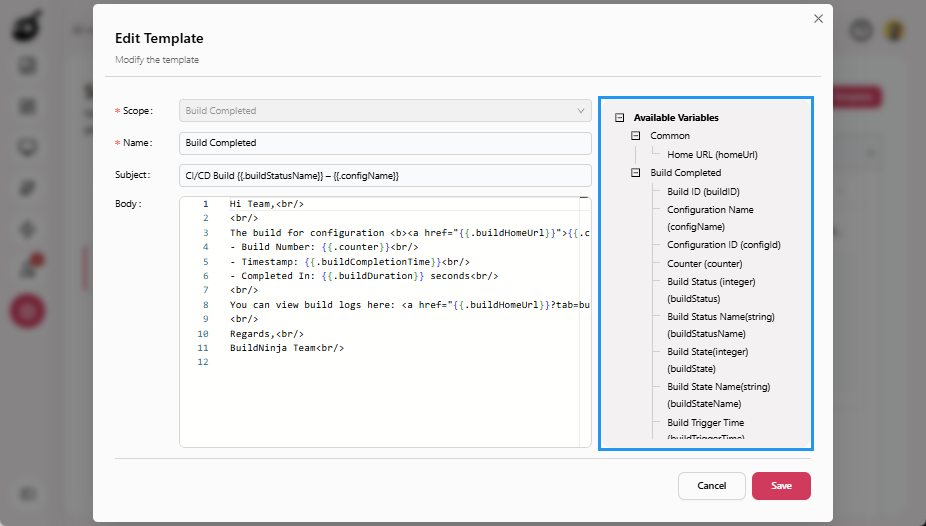
Common Variables (All Templates)
Common variables are available in all mail templates and can be used to insert common application-related information.
| Label | Variable | Description | Example |
|---|---|---|---|
| Home URL | homeUrl | The home URL of the application. | <a href="{{.homeUrl}}">Home</a> |
User and Account Template Variables
User and account template variables are used in user and account–related email templates to include recipient-specific details such as the user’s name, email address, and account status information. These variables are applicable to Signup, User Added, User Blocked, Forgot Password, Password Reset, User Approved, and User Rejected templates.
| Label | Variable | Description | Example |
|---|---|---|---|
| Name | name | Name of the user the email is addressed to. | Hello {{.name}}, how are you? |
email | Email address of the user the mail is addressed to. | We sent the verification code to {{.email}}. | |
| Reset Password Link | resetPassLink | Link to reset the password. | <a href="{{.resetPassLink}}">Reset password</a> |
| New Password | newPassword | The temporary password set by the administrator during a password reset. Users should change this password after logging in. | Your new password is {{.newPassword}}. Please change it after logging in. |
| Reason | reason | Reason for approving or rejecting the user account. | Reason: {{.reason}} |
resetPassLinkis supported only for the Forgot Password template.newPasswordis supported only for the Password Reset template.reasonis supported only for User Approved and User Rejected templates.
Build and CI Template Variables
Build and CI template variables are used in build notification templates to include build and configuration details, such as build status, configuration name, timestamps, and links to build results. These variables are applicable to Build Failure, Build Success, and Build Completed templates.
| Label | Variable | Description | Example |
|---|---|---|---|
| Build ID | buildId | The GUID of the build. | <b>Build ID:</b> {{.buildId}} |
| Configuration Name | configName | Name of the build configuration. | <b>Config:</b> {{.configName}} |
| Configuration ID | configId | The GUID of the configuration. | <b>Config ID:</b> {{.configId}} |
| Counter | counter | The counter of the configuration. | #{{.counter}} |
| Build Status (Integer) | buildStatus | The numeric status code of the build. | {{.buildStatus}} |
| Build Status Name | buildStatusName | The status of the build. | {{.buildStatusName}} |
| Build State (Integer) | buildState | The numeric state code of the build. | {{.buildState}} |
| Build State Name | buildStateName | The state of the build. | {{.buildStateName}} |
| Build Trigger Time | buildTriggerTime | The time when the build was triggered. | {{.buildTriggerTime}} |
| Build Schedule Time | buildScheduleTime | The scheduled time of the build. | {{.buildScheduleTime}} |
| Build Completion Time | buildCompletionTime | The time when the build was completed. | {{.buildCompletionTime}} |
| Build Duration | buildDuration | The duration of the build in seconds. | {{.buildDuration}} seconds |
| Build Home URL | buildHomeUrl | The URL of the build details page. | <a href="{{.buildHomeUrl}}">View Build</a> |
SMTP Test Template Variables
SMTP test template variables are used only in SMTP test templates to display the SMTP server configuration details used while sending test emails. These variables are applicable to Test SMTP template.
| Label | Variable | Description | Example |
|---|---|---|---|
| Host | host | The host domain where the SMTP server is located. | {{.host}} |
| Port | port | The port number on which the SMTP server is located. | {{.port}} |
| Encryption | encryption | The encryption method used by SMTP. | {{.encryption}} |
- Variables are validated at save time.
- Templates cannot be saved if unsupported variables are present.
- Use HTML formatting carefully to ensure compatibility across email clients.